SSH key management for SFTP storage
SSH keys provide passwordless authentication for SFTP storage. Keys are created and managed in the CDB Technical Web Portal.
Adding an SSH key
- 1
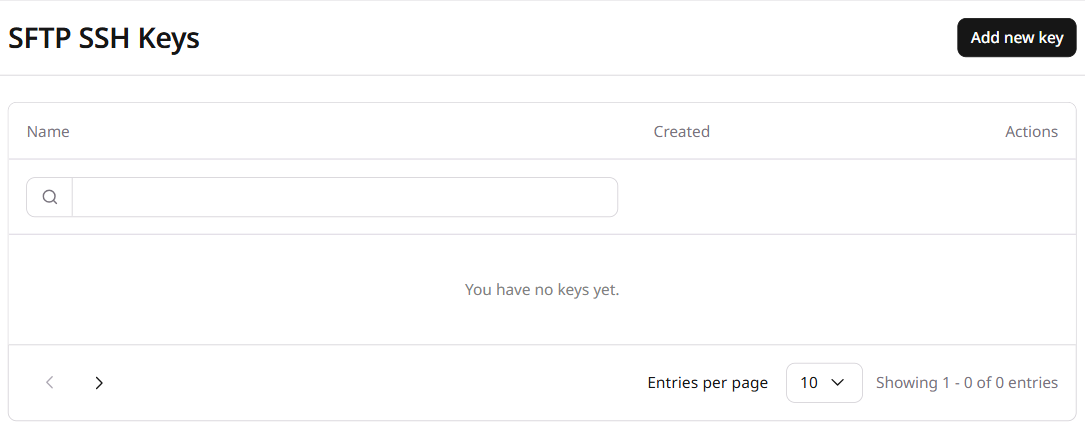
Open the SFTP SSH Keys section
In the CDB Technical Web Portal, navigate to Object Storage > SFTP SSH Keys:
- 2
Add a new key
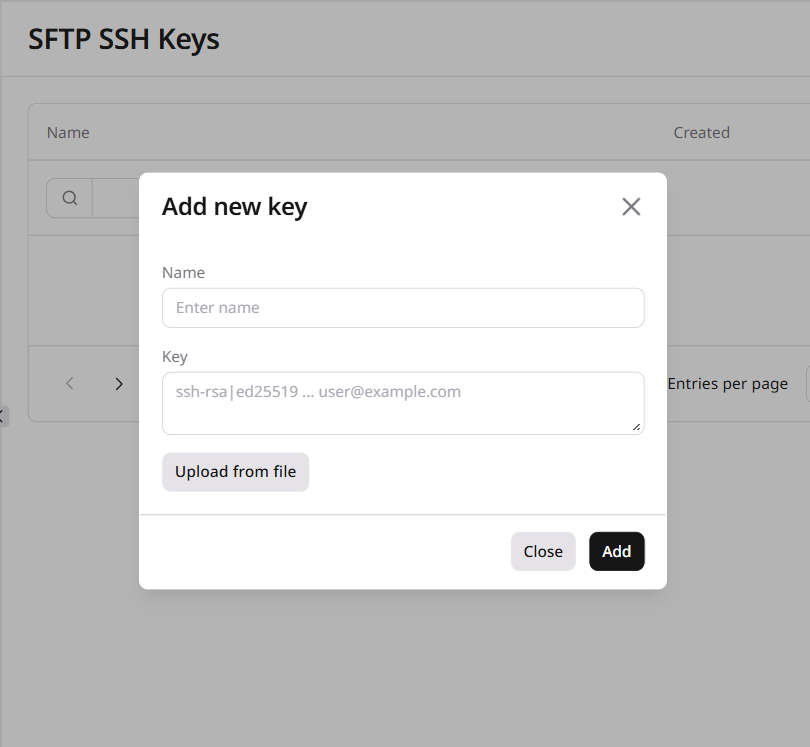
Click Add new key. The form opens:
- 3
Name the key
Enter a name using letters, numbers, underscores, and dashes. The name cannot exceed 128 characters.
- 4
Add the public key and save
Paste the public key into the Key field, or click Upload from file to load it from a file. Click Add to save.
- 5
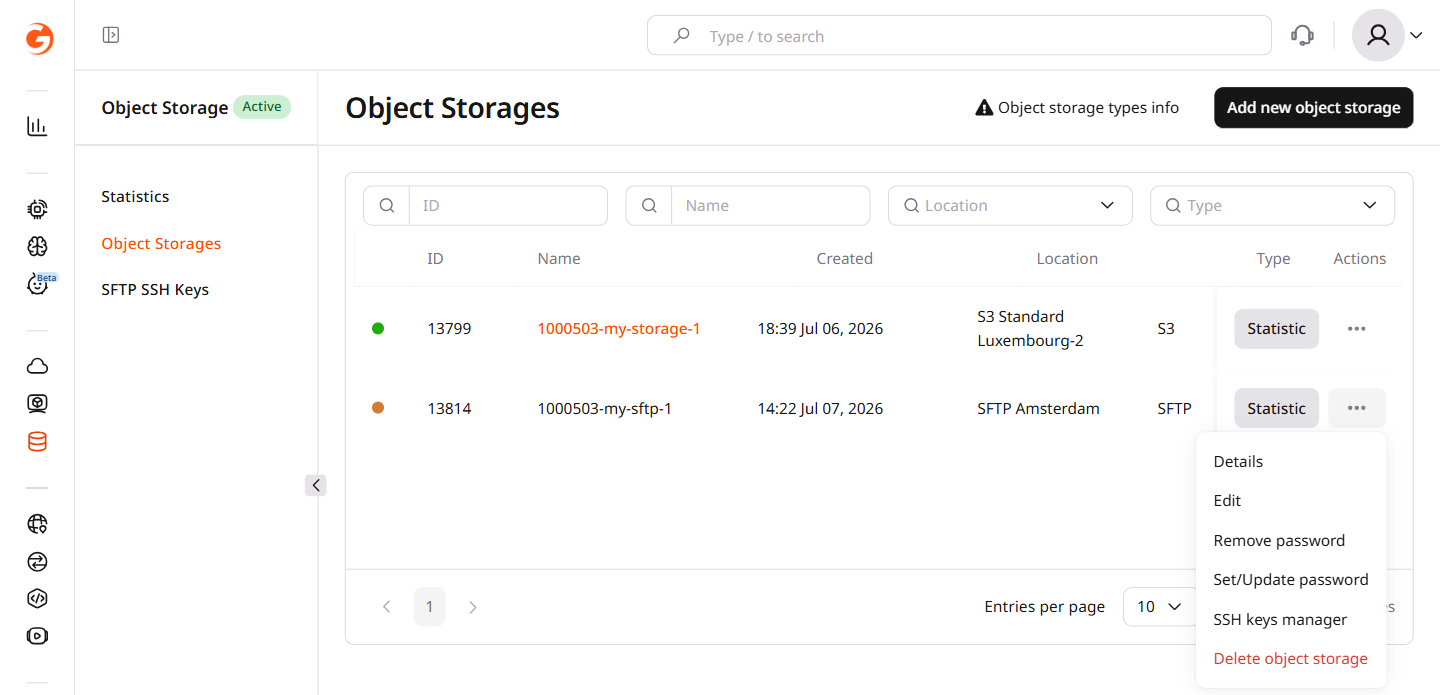
Assign the key to SFTP storage
Navigate to Object Storage > Object Storages. Find the SFTP storage, open its three-dot menu, and select SSH keys manager:
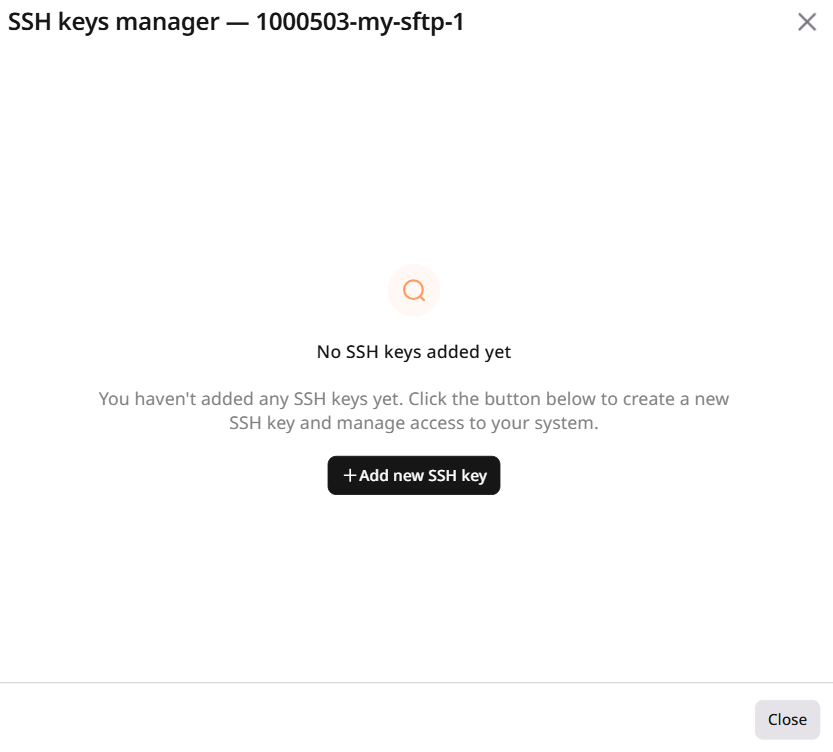
In the dialog that opens, click Add new SSH key, enter the key name and paste the public key, then click Add:
SSH key management uses two separate endpoints — one for the key registry and one for assigning keys to SFTP storage. Keys are stored account-wide and can be assigned to multiple storages. Up to five keys can be active per storage at the same time.
An API token is required.
export GCORE_API_KEY="{YOUR_API_KEY}"
Add an SSH key
Creates a named SSH public key in the account-level key registry. Supported formats are ssh-rsa and ssh-ed25519.
| Parameter | Required | Description |
|---|---|---|
name | Yes | Key name, letters/numbers/underscores/dashes, max 128 characters |
public_key | Yes | Full SSH public key string including key type prefix |
from gcore import CDB

client = CDB()

key = client.storage.ssh_keys.create(
    name="my-ssh-key",
    public_key="ssh-ed25519 AAAAC3NzaC1lZDI1NTE5AAAA... user@host",
)
print(f"Key ID: {key.id}  name={key.name}")
package main

import (
    "context"
    "fmt"
    "log"

    gcore "github.com/G-Core/gcore-go"
    "github.com/G-Core/gcore-go/storage"
)

func main() {
    client := gcore.NewClient()
    ctx := context.Background()

    key, err := client.Storage.SSHKeys.New(ctx, storage.SSHKeyNewParams{
        Name:      "my-ssh-key",
        PublicKey: "ssh-ed25519 AAAAC3NzaC1lZDI1NTE5AAAA... user@host",
    })
    if err != nil {
        log.Fatalf("create ssh key: %v", err)
    }
    fmt.Printf("Key ID: %d  name=%s\n", key.ID, key.Name)
}
curl -X POST https://api.cdb-staging.cdn.orange.com/storage/v4/ssh_keys \
  -H "Authorization: APIKey $GCORE_API_KEY" \
  -H "Content-Type: application/json" \
  -d '{
    "name": "my-ssh-key",
    "public_key": "ssh-ed25519 AAAAC3NzaC1lZDI1NTE5AAAA... user@host"
  }'
The API returns:
{
  "id": 2714,
  "name": "my-ssh-key",
  "public_key": "ssh-ed25519 AAAAC3NzaC1lZDI1NTE5AAAA... user@host",
  "created_at": "2026-07-13T16:41:35Z"
}
Save the key ID:
export SSH_KEY_ID=2714
List SSH keys
Returns all SSH keys stored in the account.
from gcore import CDB

client = CDB()

keys = client.storage.ssh_keys.list()
for k in keys:
    print(f"id={k.id}  name={k.name}  created_at={k.created_at}")
package main

import (
    "context"
    "fmt"
    "log"

    gcore "github.com/G-Core/gcore-go"
    "github.com/G-Core/gcore-go/storage"
)

func main() {
    client := gcore.NewClient()
    ctx := context.Background()

    page, err := client.Storage.SSHKeys.List(ctx, storage.SSHKeyListParams{})
    if err != nil {
        log.Fatalf("list ssh keys: %v", err)
    }
    for _, k := range page.Results {
        fmt.Printf("id=%d  name=%s\n", k.ID, k.Name)
    }
}
curl https://api.cdb-staging.cdn.orange.com/storage/v4/ssh_keys \
  -H "Authorization: APIKey $GCORE_API_KEY"
The API returns:
{
  "count": 1,
  "results": [
    {
      "id": 2714,
      "name": "my-ssh-key",
      "public_key": "ssh-ed25519 AAAAC3NzaC1lZDI1NTE5AAAA... user@host",
      "created_at": "2026-07-13T16:41:35Z"
    }
  ]
}
Assign keys to SFTP storage
Links one or more SSH keys to an SFTP storage by ID. The ssh_key_ids field replaces the entire list of assigned keys — include all keys that should remain active, not the new ones alone. Send an empty array to remove all keys.
| Parameter | Required | Description |
|---|---|---|
ssh_key_ids | Yes | Array of SSH key IDs to assign. Replaces all existing assignments. |
import os
from gcore import CDB

client = CDB()
storage_id = int(os.environ["SFTP_STORAGE_ID"])
ssh_key_id = int(os.environ["SSH_KEY_ID"])

sftp = client.storage.sftp_storages.update(storage_id, ssh_key_ids=[ssh_key_id])
print(f"Assigned key IDs: {sftp.ssh_key_ids}")
package main

import (
    "context"
    "fmt"
    "log"
    "os"
    "strconv"

    gcore "github.com/G-Core/gcore-go"
    "github.com/G-Core/gcore-go/storage"
)

func main() {
    sftpStorageID, _ := strconv.ParseInt(os.Getenv("SFTP_STORAGE_ID"), 10, 64)
    sshKeyID, _ := strconv.ParseInt(os.Getenv("SSH_KEY_ID"), 10, 64)

    client := gcore.NewClient()
    ctx := context.Background()

    sftp, err := client.Storage.SftpStorages.Update(ctx, sftpStorageID, storage.SftpStorageUpdateParams{
        SSHKeyIDs: []int64{sshKeyID},
    })
    if err != nil {
        log.Fatalf("assign keys: %v", err)
    }
    fmt.Printf("Assigned key IDs: %v\n", sftp.SSHKeyIDs)
}
curl -X PATCH "https://api.cdb-staging.cdn.orange.com/storage/v4/sftp_storages/$SFTP_STORAGE_ID" \
  -H "Authorization: APIKey $GCORE_API_KEY" \
  -H "Content-Type: application/json" \
  -d '{"ssh_key_ids": [2714]}'
The API returns the updated SFTP storage object with ssh_key_ids reflecting the new assignment.
Delete an SSH key
Removes an SSH key from the account registry. If the key is currently assigned to any SFTP storage, it is also removed from those storages automatically.
import os
from gcore import CDB

client = CDB()
ssh_key_id = int(os.environ["SSH_KEY_ID"])

client.storage.ssh_keys.delete(ssh_key_id)
print("SSH key deleted")
package main

import (
    "context"
    "fmt"
    "log"
    "os"
    "strconv"

    gcore "github.com/G-Core/gcore-go"
)

func main() {
    sshKeyID, _ := strconv.ParseInt(os.Getenv("SSH_KEY_ID"), 10, 64)

    client := gcore.NewClient()
    ctx := context.Background()

    err := client.Storage.SSHKeys.Delete(ctx, sshKeyID)
    if err != nil {
        log.Fatalf("delete ssh key: %v", err)
    }
    fmt.Println("SSH key deleted")
}
curl -X DELETE "https://api.cdb-staging.cdn.orange.com/storage/v4/ssh_keys/$SSH_KEY_ID" \
  -H "Authorization: APIKey $GCORE_API_KEY"
Returns HTTP 204 with no response body.
Declare SSH keys for SFTP storage authentication using the CDB Terraform provider v2.
Add an SSH key
Registers a public key in the account-level registry. Supported formats are ssh-rsa and ssh-ed25519. Changing the key name recreates the resource — the old key is deleted and a new one is created in its place.
resource "gcore_storage_ssh_key" "example" {
  name       = "my-ssh-key"
  public_key = "ssh-ed25519 AAAAC3NzaC1lZDI1NTE5AAAA... user@host"
}

output "ssh_key_id" {
  value = gcore_storage_ssh_key.example.id
}

# terraform import gcore_storage_ssh_key.example '<ssh_key_id>'
terraform apply
Assign keys to SFTP storage
Pass key IDs in the ssh_key_ids attribute of a gcore_storage_sftp resource. The list replaces all existing assignments — include every key that should remain active. Up to five keys are allowed per storage.
resource "gcore_storage_sftp" "example" {
  location_name = "ams"
  name          = "my-sftp-storage"
  password_mode = "none"
  ssh_key_ids   = [gcore_storage_ssh_key.example.id]
}
terraform apply
To remove all key assignments, set ssh_key_ids = [] and apply.
Delete an SSH key
Remove the resource block — Terraform deletes the key from the account registry on the next apply. Keys assigned to any SFTP storage are automatically unlinked before deletion.
# Remove or comment out this block:
# resource "gcore_storage_ssh_key" "example" {
#   name       = "my-ssh-key"
#   public_key = "ssh-ed25519 AAAAC3NzaC1lZDI1NTE5AAAA... user@host"
# }
terraform apply