Create records in zone apex (CNAME flattening)
CNAME flattening is a CDB Managed DNS feature that resolves CNAME chains at the zone apex to A or AAAA records, bypassing the RFC 1034 restriction that prevents CNAME records from coexisting with mandatory NS and SOA records.
Zone apex record restrictions
CNAME records are increasingly used to integrate domains with CDNs and other services that route traffic through dynamically assigned IP addresses. Using an A record, which specifies the concrete IP address that resolves the domain, may not be suitable in cases where IP addresses change frequently based on the geolocation of requests.
According to the RFC 1034 specification, a CNAME record cannot coexist with other records. Therefore, it is impossible to specify a CNAME record for the root domain, also known as the "apex domain" (e.g., sample-test.com), because it has mandatory NS and SOA records.
While using a subdomain (e.g., cdn.sample-test.com) for CNAME record creation can be sufficient, some website owners may want to integrate their root domain. For this situation, CDB Managed DNS provides the CNAME flattening feature.
CNAME flattening mechanism
CNAME flattening is a mechanism that allows specification restrictions to be bypassed, enabling a CNAME to be specified for the root domain. It resolves the CNAME chain and uses the IP address of the final A or AAAA record. This synthetic record is then cached, respecting its TTL, and used to answer subsequent DNS queries for the apex domain on the CDB DNS side.
By using CNAME flattening, we avoid specification violations, and DNS resolution works correctly in more cases. The local cache layer also decreases total resolution time, as cached responses serve subsequent queries directly.
Configuration of CNAME flattening
CDB Managed DNS provides CNAME flattening to customers on all plans by default.
- 1
Navigate to the Records tab
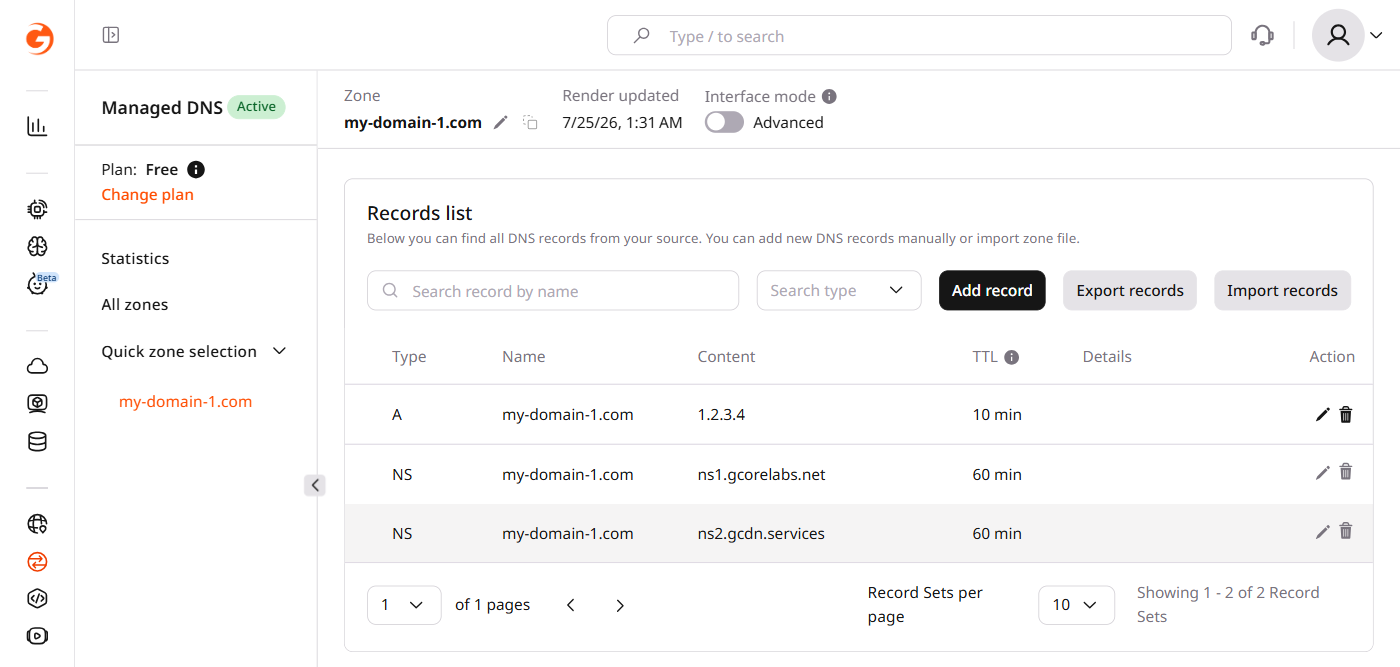
In the CDB Technical Web Portal, navigate to DNS → Managed DNS, click the zone name, and open the Records tab.
- 2
Delete the A record
Click the delete icon next to the A record for the root domain. In the Delete record dialog, click Yes, delete.
- 3
Add a CNAME record
Click Add record and configure the new record:
- Set Type to CNAME.
- In the Name field, enter the root domain.
- In the Content field, enter the target domain.
- Click Add.
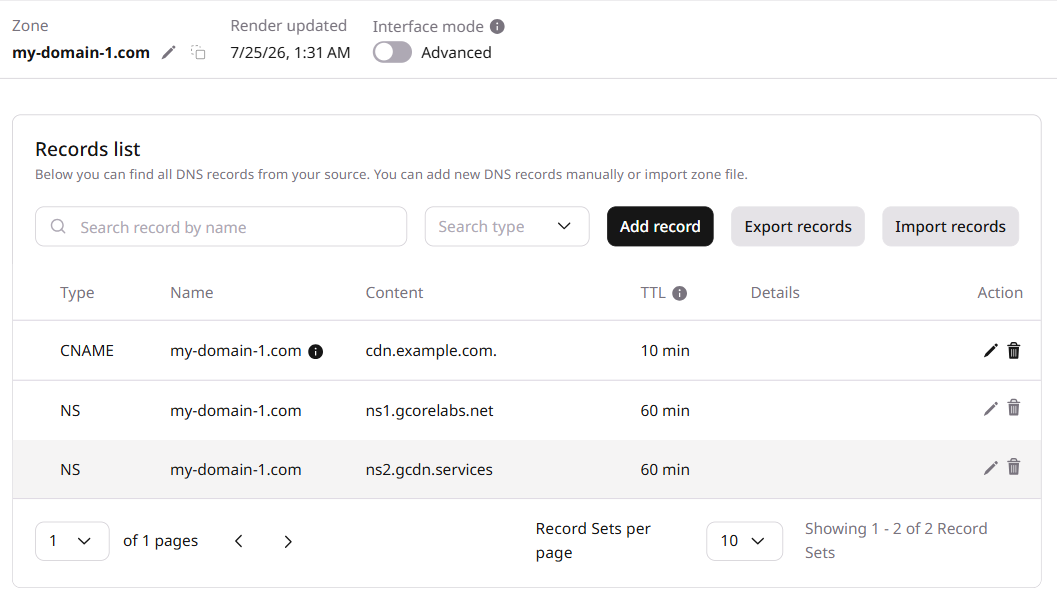
CDB Managed DNS supports CNAME flattening only when the zone apex contains a single CNAME record. The CDB DNS Lookup tool verifies the CNAME record's resolved value.