Edge URL redirect
This service speeds up navigation and relieves your origin servers by moving the URL redirection from the origin to an edge server closer to the end users
Overview
When a user enters a URL in their browser to access your website or application, the request first reaches the redirector located at the "edge" of the network—closest to the user—rather than directly reaching the origin server. This service speeds up end-user navigation and relieves your origin servers of non-essential tasks.
Use case:
Website growth and evolution: As your website's structure evolves over time, from blog to a more professional and complete website involving online sales for instance, the list of redirection rules can become extensive as the structure will completely change over time with pages moved to other addresses. It will make redirections increasingly difficult for the origin server to manage efficiently. Offloading redirection management to the edge helps alleviate this burden, enabling the origin server to focus on tasks that cannot be handled at the network edge, thereby improving overall performance.
Benefits
-
Enhanced Speed: Save the round trip between end-user and Origin Server allows faster and more efficient redirection.
-
Relieve Origin Server: Reduced origin server load frees up capacity for other performance-critical tasks that require additional resources.
-
SEO Performance Properly managed redirection is key for strong rankings and visibility on Search Engines.
Configurations
The internal/Client operation team member should configure one parameter named RULES into edge compute ihm
this variables should contains a list of rules into a JSON format. Each rule must have elements
Edge URL Redirect Custom Rule Configuration
This document describes the JSON configuration structure for a custom edge url redirect rule.
Overview
The configuration defines a redirect rule with specific conditions and actions that determine when and how requests should be redirected.
Configuration Properties Quick Reference
| Category | Property | Type | Required | Description |
|---|---|---|---|---|
| Root | name | string | Yes | Human-readable name for the rule |
| Root | order | number | Yes | Execution priority (lower numbers execute first) |
| Root | action | object | Yes | Defines the redirect behavior and modifications |
| Root | conditions | object | No | Specifies when the rule should be applied |
| Action - Redirect | redirect.status_code | number | No | HTTP status code for the redirect (301, 302). Default 302 |
| Action - Redirect | redirect.redirect_url | string | Yes | Target URL with optional placeholders like {userId} |
| Action - Redirect | redirect.redirect_type | string | Yes | Type of redirect: None/Inherit/Relative |
| Action - Query Strings | query_strings | array | No | Query parameter modifications (preserve_all, remove_all, remove, modify, add) |
| Conditions - Time | datetime_start | string | No | Rule activation start time (ISO Format: yyyy-MM-ddTHH:mm:ss) |
| Conditions - Time | datetime_end | string | No | Rule activation end time (ISO Format: yyyy-MM-ddTHH:mm:ss) |
| Conditions - IP | ip.negation | boolean | Yes* | Whether to negate the IP condition (*if ip used) |
| Conditions - IP | ip.value | array | Yes* | List of IP addresses/CIDR blocks (*if ip used) |
| Conditions - Countries | countries.negation | boolean | Yes* | Whether to negate the country condition (*if countries used) |
| Conditions - Countries | countries.value | array | Yes* | List of country codes (*if countries used) |
| Conditions - Hostname | hostname | string | No | Target hostname pattern (supports wildcards) |
| Conditions - URL | url.negation | boolean | Yes* | Whether to negate the URL condition (*if url used) |
| Conditions - URL | url.value | string | Yes* | URL pattern to match (*if url used) |
| Conditions - URL | url.match_type | string | Yes* | Matching method: regex/equals/contains (*if url used) |
| Conditions - User Agent | user_agent.negation | boolean | Yes* | Whether to negate the user agent condition (*if user_agent used) |
| Conditions - User Agent | user_agent.value | array | Yes* | List of user agent patterns (*if user_agent used) |
| Conditions - User Agent | user_agent.match_type | string | Yes* | Matching method (*if user_agent used) |
| Conditions - File Ext | file_extensions.negation | boolean | Yes* | Whether to negate the file extension condition (*if file_extensions used) |
| Conditions - File Ext | file_extensions.value | array | Yes* | List of file extensions to match (*if file_extensions used) |
| Conditions - Headers | headers[].header_name | string | Yes* | Name of the header to check (*if headers used) |
| Conditions - Headers | headers[].negation | boolean | Yes* | Whether to negate the condition (*if headers used) |
| Conditions - Headers | headers[].match_type | string | Yes* | Matching method: equals/contains/regex (*if headers used) |
| Conditions - Headers | headers[].value | string | Yes* | Value to match against (*if headers used) |
| Conditions - Headers Exist | headers_exist[].negation | boolean | Yes* | Whether to negate the condition (*if headers_exist used) |
| Conditions - Headers Exist | headers_exist[].header_name | string | Yes* | Request header name (*if headers_exist used) |
| Conditions - Query Strings | query_strings[].negation | boolean | Yes* | Whether to negate the condition (*if query_strings used) |
| Conditions - Query Strings | query_strings[].key | string | Yes* | Query string key name (*if query_strings used) |
| Conditions - Query Strings | query_strings[].value | string | Yes* | Value to match (*if query_strings used) |
| Conditions - Query Strings | query_strings[].match_type | string | Yes* | Matching method: equals/contains (*if query_strings used) |
| Conditions - Query Strings Exist | query_strings_exist[].negation | boolean | Yes* | Whether to negate the condition (*if query_strings_exist used) |
| Conditions - Query Strings Exist | query_strings_exist[].key | string | Yes* | Query string key name (*if query_strings_exist used) |
Root Properties
| Property | Type | Required | Description |
|---|---|---|---|
name | string | Yes | Human-readable name for the rule |
order | number | Yes | Execution priority (lower numbers execute first) |
action | object | Yes | Defines the redirect behavior and modifications |
conditions | object | No | Specifies when the rule should be applied |
Action Configuration
Redirect Settings
| Property | Type | Required | Description |
|---|---|---|---|
redirect.status_code | number | No | HTTP status code for the redirect (301, 302). default 302 |
redirect.redirect_url | string | Yes | Target URL with optional placeholders like {userId} |
redirect.redirect_type | string | Yes | Type of redirect must be : None: Requires a fully-qualified URL, with protocol, in the Redirect Path field. Inherit: Creates an absolute path using the request's protocol and hostname and the path in the Redirect URL field. The response includes this absolute path in its Location header. Relative:Takes the path entered in the Redirect URL field and sets it in the response’s Location header. The client or browser receiving the request decides which protocol and hostname to use. |
Query String Modifications
The query_strings array defines how to modify URL parameters:
| Rule Type | Description | Example |
|---|---|---|
preserve_all | Preserve all query parameters | rule_changes: "preserve_all" |
remove_all | Removes all query parameters | rule_changes: "remove_all" |
remove | Removes a specific parameter | key: "token", rule_changes: "remove" |
modify | Changes the value of an existing parameter | key: "lang", value: "fr", rule_changes: "modify" |
add | Adds a new parameter | key: "key3", value: "value3", rule_changes: "add" |
Conditions Configuration
Time-based Conditions
| Property | Type | Required | Description |
|---|---|---|---|
datetime_start | string | No | Rule activation start time (ISO Format Date Time yyyy-MM-ddTHH:mm:ss) |
datetime_end | string | No | Rule activation end time (ISO Format Date Time yyyy-MM-ddTHH:mm:ss) |
IP Network Conditions
IP network conditions is an optional condition but when set the following elements must be provided
| Property | Type | Required | Description |
|---|---|---|---|
ip.negation | boolean | Yes | Whether to negate the IP condition |
ip.value | array | Yes* | List of IP addresses/CIDR blocks (*required if ip condition is used) |
Countries Conditions
Countries conditions is an optional condition but when set the following elements must be provided
| Property | Type | Required | Description |
|---|---|---|---|
countries.negation | boolean | Yes | Whether to negate the country condition |
countries.value | array | Yes* | List of country codes (*required if countries condition is used) |
Hostname Condition
| Property | Type | Required | Description |
|---|---|---|---|
hostname | string | No | Target hostname pattern (supports wildcards) |
Request URL Conditions
Request url conditions is an optional condition but when set the following elements must be provided
| Property | Type | Required | Description |
|---|---|---|---|
url.negation | boolean | Yes | Whether to negate the URL condition |
url.value | string | Yes* | URL pattern to match (*required if url condition is used) |
url.match_type | string | Yes | Matching method (regex, equals, contains). Support wildcard with regex match_type |
User Agent Conditions
User Agent conditions is an optional condition but when set the following elements must be provided
| Property | Type | Required | Description |
|---|---|---|---|
user_agent.negation | boolean | Yes | Whether to negate the user agent condition |
user_agent.value | array | Yes | List of user agent patterns (*required if user_agent condition is used) |
user_agent.match_type | string | Yes | Matching method |
File extension Conditions
File extensions conditions is an optional condition but when set the following elements must be provided
| Property | Type | Required | Description |
|---|---|---|---|
file_extensions.negation | boolean | Yes | Whether to negate the file extension condition |
file_extensions.value | array | Yes* | List of file extensions to match (*required if file_extensions condition is used) |
Header Conditions
Headers conditions is an optional array conditions but when setted a json should be provided with these elements
Header Value Matching
| Property | Type | Required | Description |
|---|---|---|---|
header_name | string | Yes | Name of the header to check |
negation | boolean | Yes | Whether to negate the condition |
match_type | string | Yes | Matching method (equals, contains, regex) |
value | string | Yes | Value to match against |
Header exist Conditions
Headers exist conditions is an optional array conditions. This conditions check the existance of an request headers. When setted each element should be a json with these elements
| Property | Type | Required | Description |
|---|---|---|---|
negation | boolean | Yes | Whether to negate the file extension condition |
header_name | string | Yes* | request header name |
Query string exist Conditions
Query String exist conditions is an optional array conditions. This conditions check the existance of an query string from request url. When setted each element should be a json with these elements
| Property | Type | Required | Description |
|---|---|---|---|
negation | boolean | Yes | Whether to negate the file extension condition |
key | string | Yes | query string's key name |
Example:
[{
    "name" : "Custom Rule for edge url redirect",
    "order": 1,
    "action": {
        "redirect": {
            "status_code" : 301,
            "redirect_url" : "/page/{userId}/",
            "redirect_type": ""
        },
        "query_strings":[
            {
                "rule_changes": "remove_all"
            },
            {
                "key": "token",
                "rule_changes": "remove"
            },
            {
                "key": "lang",
                "value": "fr",
                "rule_changes": "modify"
            },
            {
                "key": "key3",
                "value": "value3",
                "rule_changes": "add"
            }
        ]
    },
    "conditions": {
         "datetime_start": "",
         "datetime_end": "",
         "hostname": "abdoultest1.cdb-staging.*.orange.com",
         "ip_address":{
            "negation": true,
            "value": ["192.168.1.1/32", "192.168.2.0/24"]
         },
         "countries":{
            "negation": true,
            "value": ["ma", "fr", "en"]
         },
        "url": {
            "negation": true,
            "value": "/page/*/{userId}/home",
            "match_type": "regex"
        },
        "user_agent": {
            "negation": false,
            "value": ["mobile", "mozilla"],
            "match_type": "contains"
        },
        "file_extensions": {
            "negation": false,
            "value": ["jpg", "png", "txt"]
        },
        "headers":[
            {
                "header_name": "Authorization",
                "negation": false,
                "match_type": "contains",
                "value": "Bearer "
            },
            {
                "header_name": "Content-type",
                "negation": false,
                "match_type": "equals",
                "value": "application/json"
            }
        ],
        "headers_exist":[
            {
                "header_name": "Authorization",
                "negation": false
            },
            {
                "header_name": "Content-type",
                "negation": false
            }
        ],
        "query_strings":[
            {
                "negation": false,
                "key": "token",
                "value": "XXXXXXX",
                "match_type": "equals"
            },
            {
                "negation": true,
                "key": "version",
                "value": "XXXXXXX",
                "match_type": "contains"
            }
        ],
        "query_strings_exist":[
            {
                "negation": false,
                "key": "token"
            },
            {
                "negation": true,
                "key": "version"
            }
        ]
    }
}]
Steps to implement Edge URL Redirect with CDB Edge Compute
Prerequisite CDB Edge Compute must be activated for your customer.
-
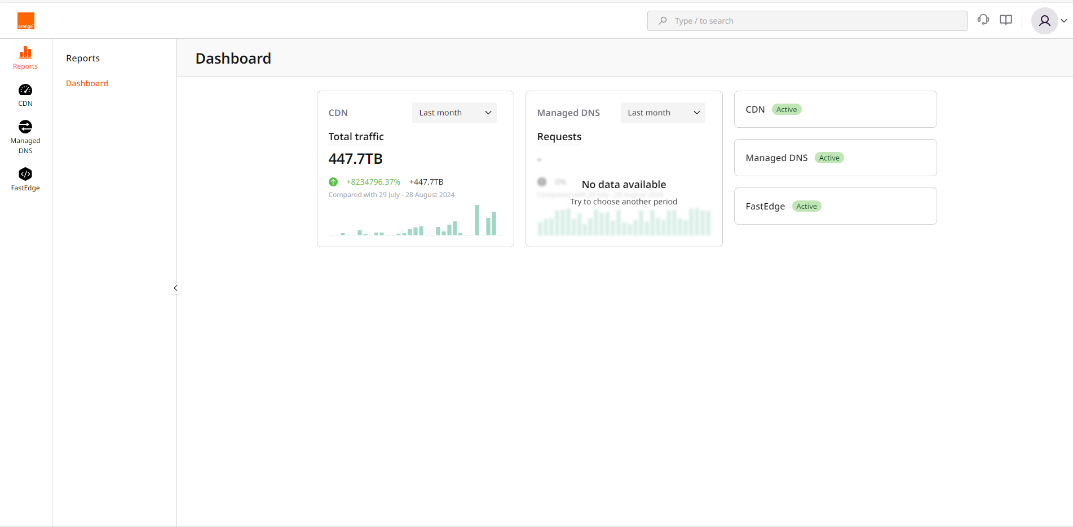
Click on the FastEdge icon on the left to switch to FastEdge management.
-
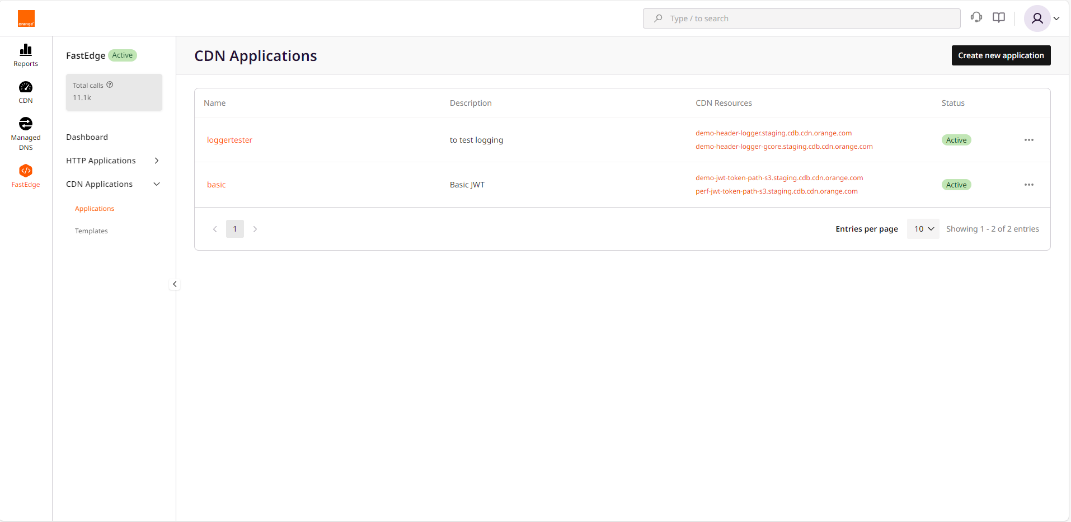
Select CDN Applications then Applications
-
Click Create new application visible on top right
-
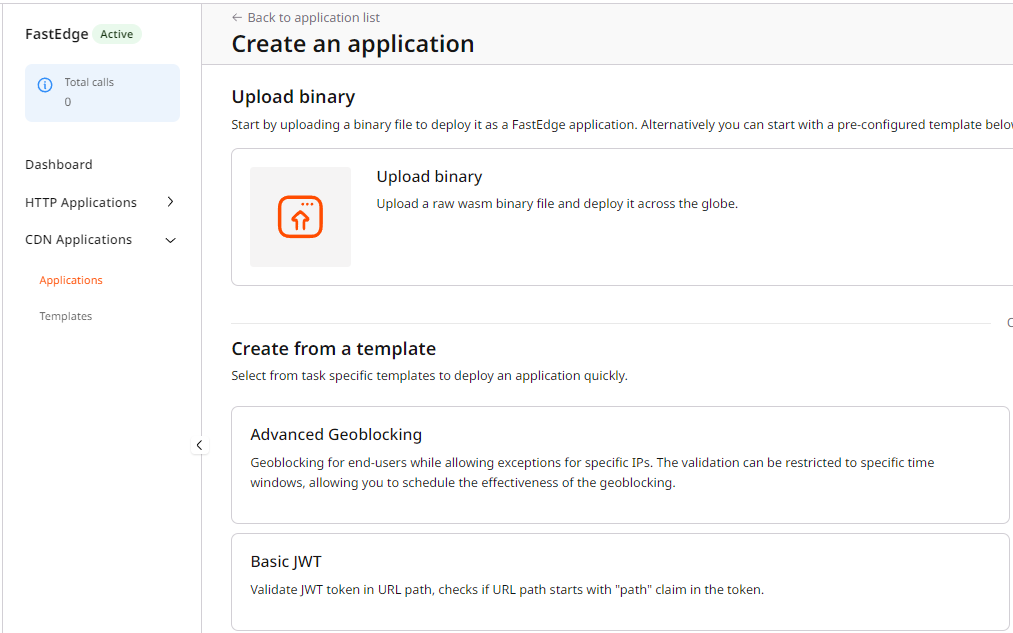
Select Edge URL redirect
-
Enter your settings
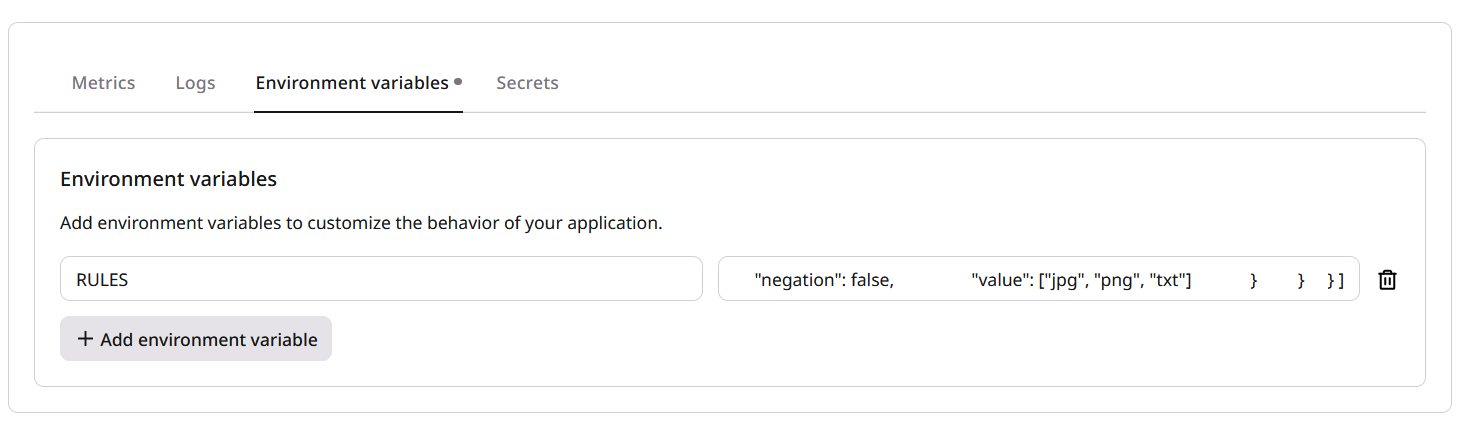
-
Click Save and deploy visible on top right At that point, your edge url redirect application is deployed on FastEdge, now it needs to be called by CDN, additional below steps are then necessary.
-
Select CDN on left pane
-
Select the CDN resource you want to associate with the Stickness function
-
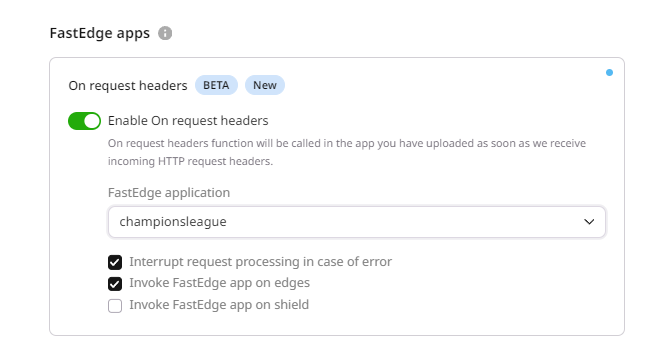
In the CDN resource configuration (OPTIONS) select FastEdge apps
-
Switch the Enable On request headers
-
Select your edge Url redirect application from then drop down list displayed by clicking Fastedge application If the Orgin Shielding on your CDN Resource uncheck the Option 'Invoke FastEdge app on shield'.
If you want to see fastedge log error in case of processing error uncheck the option Interrupt request processing in case of error