Edge Geo-blocking
Overview
Our Edge Geo-blocking feature enables content owners to restrict access to their services based on users' geographical locations (countries), IP addresses, AS numbers, HTTP referer, and user-agent. You can customize the user experience and manage content access according to your copyright policies. Countries, ASN, and ISP information are determined using the Max Mind database.
Use cases
- Sports Broadcasting Licensing: By implementing a list of blocked locations, you can effectively prevent users from regions where rights are not granted—such as certain sports where broadcast right owners can change according to the country—from accessing the service.
- Local/National-only Services: Access can be granted to users from specific countries, for example, to facilitate online government services for citizens.
- Exceptions for International Support Teams: You can grant access to specific users from a predefined list of IP addresses during designated time slots, even if they originate from blocked countries. For instance, a content owner with broadcasting rights limited to France may have a support team based in India. By setting appropriate geo-blocking rules, they can restrict access to French users while permitting their Indian support team to assist during specific hours.
- Partner or device policy enforcement: You can deny traffic based on HTTP referer or user-agent regular expressions, and combine those checks with country, IP, or ASN rules.
Benefits
- Compliance Management: Follow complex licensing agreements and regulatory requirements.
- Operational Efficiency: Maintain seamless operations even when support teams are distributed across different countries and time zones.
- Traffic Security: Protect your service by blocking access from irrelevant or potentially threatening geographic locations.
Configuration permutations
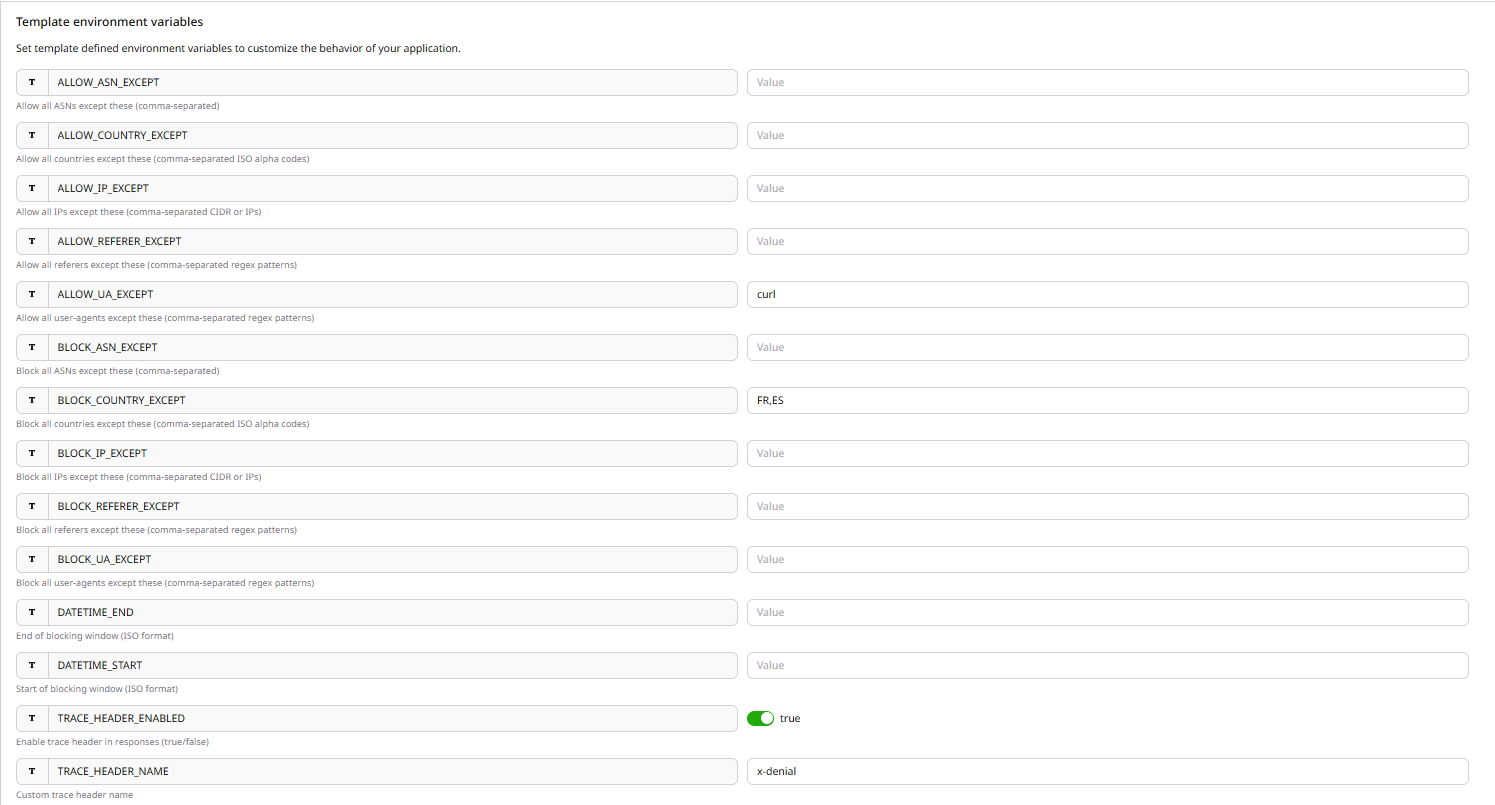
The internal/Client operation team member should configure at least one rule parameter from [ALLOW_COUNTRY_EXCEPT, BLOCK_COUNTRY_EXCEPT, ALLOW_IP_EXCEPT, BLOCK_IP_EXCEPT, ALLOW_ASN_EXCEPT, BLOCK_ASN_EXCEPT, ALLOW_REFERER_EXCEPT, BLOCK_REFERER_EXCEPT, ALLOW_UA_EXCEPT, BLOCK_UA_EXCEPT].
Configured rule families are combined as gates. If multiple rule families are configured, every configured gate must pass for the request to continue to midtier/origin. A passing country, IP, ASN, referer, or user-agent rule does not bypass the remaining configured gates. The first failing gate returns HTTP 451 and, when trace headers are enabled, identifies the denying rule family in the trace header.
For each rule family, configure only one of the ALLOW or BLOCK parameters at the same time. If both are configured for the same family, the application returns HTTP 500.
Rule semantics:
- ALLOW_*_EXCEPT: allow all values except the configured list. A matching value is denied.
- BLOCK_*_EXCEPT: block all values except the configured list. A non-matching value is denied.
| Parameter | Description |
|---|---|
| ALLOW_COUNTRY_EXCEPT | Comma-separated list of ISO ALFA2 country codes that will be blocked. |
| BLOCK_COUNTRY_EXCEPT | Comma-separated list of ISO ALFA2 country codes that will be allowed. |
Examples:
MA,FR
MA, FR, EN
- If the internal/Client operation team member configures an invalid country code, a warning log will be written and the invalid value is ignored.
- If none of the values is correct (for example MAFR,ENUS) and the value is set in BLOCK_COUNTRY_EXCEPT, all countries will be blocked.
- If none of the values is correct (for example MAFR,ENUS) and the value is set in ALLOW_COUNTRY_EXCEPT, all countries will be allowed.
- If the internal/Client operation team member configures a country in both ALLOW and BLOCK parameters, an internal error code 500 will be returned to the end user.
The HTTP Error Code 451 will be returned to the end user when a configured rule gate denies the request.
| Parameter | Description |
|---|---|
| ALLOW_IP_EXCEPT | Comma-separated list of IPv4/IPv6 addresses or CIDR ranges that will be blocked. |
| BLOCK_IP_EXCEPT | Comma-separated list of IPv4/IPv6 addresses or CIDR ranges that will be allowed. |
Example:
95.74.153.121/32,2a01:cb06:b000:961e::/24
- If the internal/Client operation team member configures an invalid IP or CIDR, a warning log will be written and the invalid value is ignored.
- If none of the values is correct and the value is set in ALLOW_IP_EXCEPT, all IPs will be allowed.
- If none of the values is correct and the value is set in BLOCK_IP_EXCEPT, all IPs will be blocked.
- If the internal/Client operation team member configures an IP address in both ALLOW_IP_EXCEPT and BLOCK_IP_EXCEPT parameters, an internal error code 500 will be returned to the end user.
| Parameter | Description |
|---|---|
| ALLOW_ASN_EXCEPT | Comma-separated list of ASN numbers that will be blocked. |
| BLOCK_ASN_EXCEPT | Comma-separated list of ASN numbers that will be allowed. |
Example:
13335,15169,16509
- If the internal/Client operation team member configures an invalid ASN, a warning log will be written and the invalid value is ignored.
- If none of the values is correct (for example 14db6,15po6) and the value is set in ALLOW_ASN_EXCEPT, all requests will be allowed.
- If none of the values is correct (for example 14db6,15po6) and the value is set in BLOCK_ASN_EXCEPT, all ASNs will be blocked.
- If the internal/Client operation team member configures an ASN in both ALLOW_ASN_EXCEPT and BLOCK_ASN_EXCEPT parameters, an internal error code 500 will be returned to the end user.
| Parameter | Description |
|---|---|
| ALLOW_REFERER_EXCEPT | Comma-separated list of case-insensitive regular expressions for referers that will be blocked. |
| BLOCK_REFERER_EXCEPT | Comma-separated list of case-insensitive regular expressions for referers that will be allowed. |
Example:
^https://allowed.example.com,primevideo\.com
- If no referer rule is configured, missing referer headers are ignored.
- For ALLOW_REFERER_EXCEPT, a missing referer is treated as no match and the referer gate passes.
- For BLOCK_REFERER_EXCEPT, a missing referer is denied because the request cannot match the configured exception list.
- If the regular expression syntax is invalid, an internal error code 500 will be returned to the end user.
| Parameter | Description |
|---|---|
| ALLOW_UA_EXCEPT | Comma-separated list of case-insensitive regular expressions for user-agents that will be blocked. |
| BLOCK_UA_EXCEPT | Comma-separated list of case-insensitive regular expressions for user-agents that will be allowed. |
Example:
PrimeVideo,SmartTV,Android
- If no user-agent rule is configured, missing user-agent headers are ignored.
- For ALLOW_UA_EXCEPT, a missing user-agent is treated as no match and the user-agent gate passes.
- For BLOCK_UA_EXCEPT, a missing user-agent is denied because the request cannot match the configured exception list.
- If the regular expression syntax is invalid, an internal error code 500 will be returned to the end user.
| Parameter | Description |
|---|---|
| DATETIME_START | ISO Format Date Time yyyy-MM-ddTHH:mm:ss |
| DATETIME_END | ISO Format Date Time yyyy-MM-ddTHH:mm:ss |
- If the internal/Client operation team member doesn't fill any of DATETIME_START and DATETIME_END, the configuration is always applicable.
- If the internal/Client operation team member doesn't fill DATETIME_START, the configuration is applicable until the value filled for DATETIME_END.
- If the internal/Client operation team member doesn't fill DATETIME_END, the configuration is applicable from the value filled for DATETIME_START.
- If the internal/Client operation team member fills both DATETIME_START and DATETIME_END, the configuration is applicable from the value filled for DATETIME_START to the value filled for DATETIME_END.
- If the internal/Client operation team member fills a value DATETIME_START that is greater than DATETIME_END, an internal error code 500 will be returned to the end user.
| Parameter | Description |
|---|---|
| TRACE_HEADER_ENABLED | Boolean value to enable trace headers on edge deny responses. Defaults to enabled when unset or empty. Accepted values are true and false. |
| TRACE_HEADER_NAME | Response trace header name. Defaults to x-pv-trace when unset or empty. |
When this edge application denies a request because of a country, IP, ASN, referer, or user-agent rule, it returns HTTP 451 and adds the configured trace header when trace headers are enabled. Every response that carries the trace header also includes Access-Control-Expose-Headers with the configured trace header name so browser clients can read it.
Trace values:
| Deny reason | Trace value |
|---|---|
| Country/geo | cdn=orange-cdn;layer=edge;tag=g |
| IP | cdn=orange-cdn;layer=edge;tag=i |
| ASN | cdn=orange-cdn;layer=edge;tag=a |
| Referer | cdn=orange-cdn;layer=edge;tag=r |
| User-agent | cdn=orange-cdn;layer=edge;tag=u |
Steps to implement Edge Geo-Blocking with CDB Edge Compute
Prerequisite CDB Edge Compute must be activated for your customer.
-
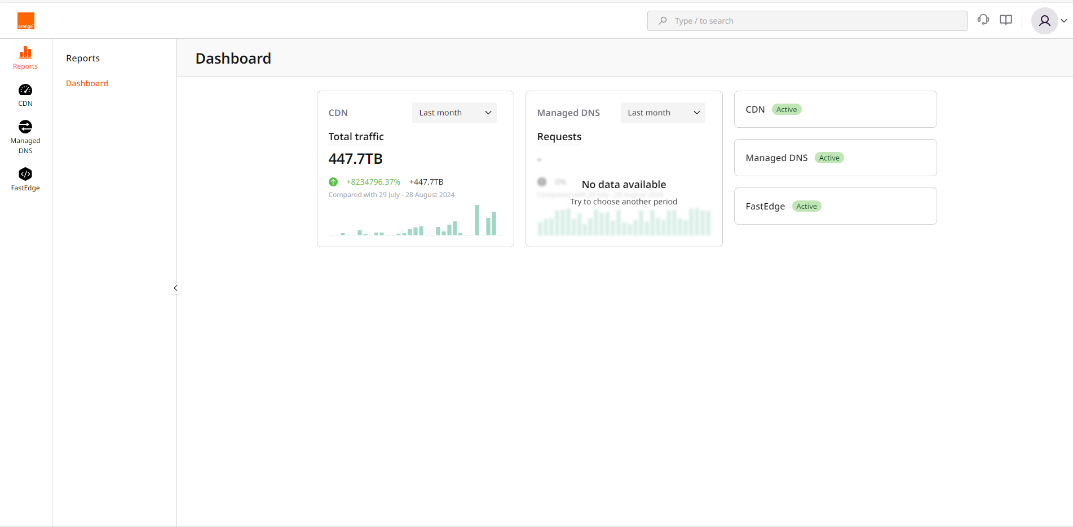
Click on the FastEdge icon on the left to switch to FastEdge management.
-
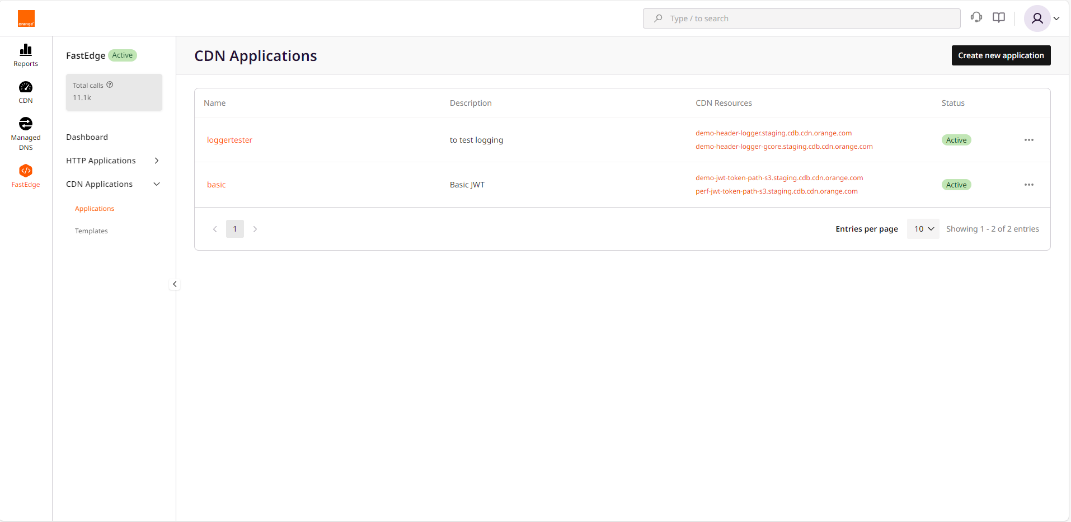
Select CDN Applications then Applications
-
Click Create new application visible on top right
-
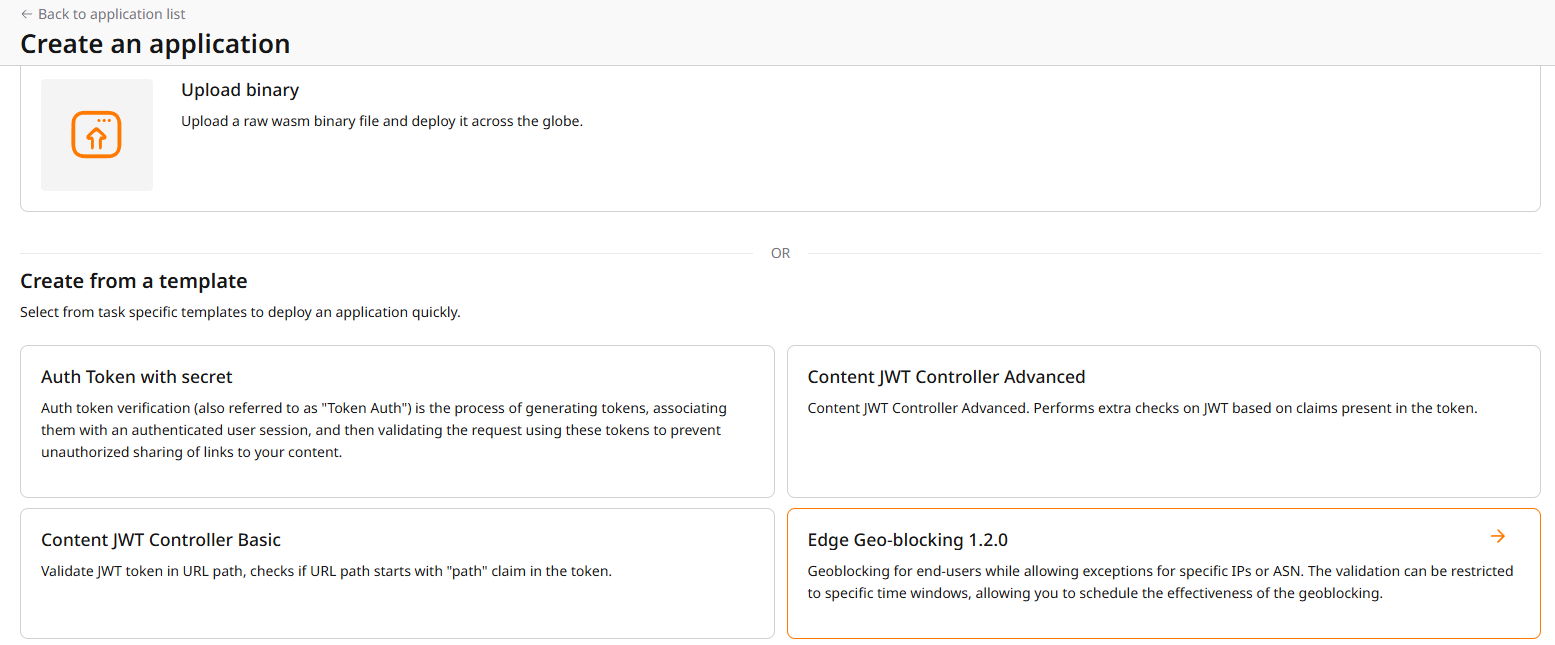
Select Edge Geo-blocking
-
Enter your settings
-
Click Save and deploy visible on top right At that point, your geoblocking application is deployed on FastEdge, now it needs to be called by CDN, additional below steps are then necessary.
-
Select CDN on left pane
-
Select the CDN resource you want to associate with the Edge Geo-blocking function
-
In the CDN resource configuration (OPTIONS) select FastEdge apps
-
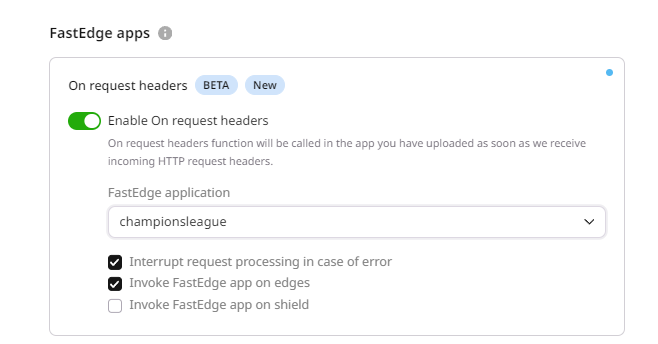
Switch the Enable On request headers(before cache)
-
Select your geoblocking application from then drop down list displayed by clicking Fastedge application If Origin Shielding is enabled on your CDN resource, uncheck the option 'Invoke FastEdge app on shield'.